

Download Yahoo Backup Tool – Secure Email Export & Migration for Windows
Yahoo Backup Tool, developed by Migrate Cloud Data, is a dedicated Windows utility that helps users safeguard and move their Yahoo Mail data. The software focuses on data security, supports a wide range of export formats, and offers direct migration to popular email services such as Office 365, Gmail, and Thunderbird. Designed for Windows 11 and other recent Windows releases, the tool combines a clean interface with powerful filtering options, making mailbox management both simple and reliable.
Comprehensive Overview & System Compatibility
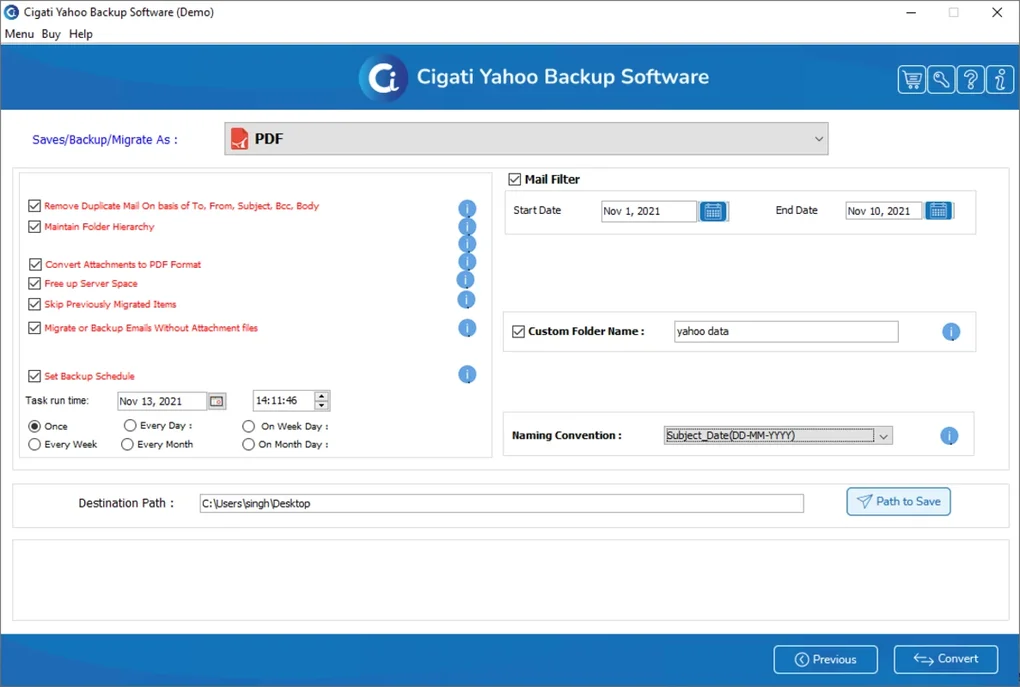
The Yahoo Backup Tool positions itself as a one‑stop solution for anyone who needs to back up or transfer Yahoo Mail messages without risking data loss. Upon launch, the program guides users through a step‑by‑step wizard that starts with authenticating the Yahoo account, then moves on to selecting the folders or messages to export. Users can apply filters based on date ranges, sender, or keywords, ensuring that only the relevant subset of mail is processed. This granular control is especially valuable for businesses that must comply with retention policies or for individuals looking to keep only personal correspondence.
From a compatibility standpoint, the application is built specifically for the Windows ecosystem. It runs smoothly on Windows 11, Windows 10 (64‑bit), and Windows 8.1, taking advantage of modern APIs for faster file handling and secure network connections. The installer automatically checks for required .NET runtime components and prompts the user to install missing prerequisites, guaranteeing a hassle‑free setup. While the tool is Windows‑centric, exported files (PST, MBOX, EML, PDF, CSV) are universally readable, allowing seamless import into macOS‑based clients or mobile apps after the migration is complete.
Security is baked into every stage of the process. All communication with Yahoo’s servers is encrypted via TLS 1.2, and the software never stores login credentials locally. Instead, it creates a temporary session token that expires after the backup operation finishes. Moreover, the tool validates the integrity of each exported file by generating SHA‑256 checksums, giving users confidence that their mailbox data remains unaltered during transit.
Key Features, Installation Guide, and Frequently Asked Questions
Feature List
- Export to multiple formats: PST, MBOX, PDF, CSV, and EML.
- Direct migration to Office 365, Gmail, and Thunderbird.
- Advanced mail filtering by date, sender, subject, or keyword.
- Preserves original folder hierarchy for seamless re‑import.
- Data integrity verification with SHA‑256 checksum generation.
- Secure TLS‑encrypted connections; no password storage.
- Batch processing for large mailboxes (up to 10 GB per session).
- Automatic detection of Windows version and prerequisite installation.
Installation & Usage Instructions
Installing Yahoo Backup Tool is straightforward:
- Download the installer from the official Migrate Cloud Data website.
- Run the
.exefile; the wizard will request administrator rights. - The setup checks for the required .NET Framework; if missing, it offers a direct download link.
- After installation, launch the program from the Start menu.
- Enter your Yahoo credentials; the app uses OAuth to avoid password storage.
- Select the mailbox folders you wish to back up or migrate.
- Choose the export format or target email service, then click “Start”.
- Monitor progress via the real‑time status bar; a summary report appears upon completion.
For migration to Office 365 or Gmail, the tool prompts you to sign into the destination account and maps Yahoo folders to the corresponding labels or folders in the target service. The entire process typically completes within 30‑45 minutes for a 5 GB mailbox, depending on network speed.
Pros & Cons
- Pros
- Supports a broad array of export formats, covering both corporate and personal needs.
- Direct migration eliminates the need for intermediate files.
- Granular filtering saves time and storage space.
- Strong security model protects credentials and data integrity.
- User‑friendly wizard makes the tool accessible to non‑technical users.
- Cons
- Only available for Windows; macOS users must rely on exported files.
- Large mailboxes may require a premium license for faster batch processing.
- No built‑in scheduler for automated recurring backups.
Frequently Asked Questions
Can I back up multiple Yahoo accounts with one installation?
Yes. After completing a backup, you can log out and log in with a different Yahoo account without reinstalling the software.
Is there a limit to the size of the mailbox I can export?
The free version handles mailboxes up to 2 GB. Larger mailboxes require the paid Pro edition, which removes size restrictions.
Will the original timestamps and read/unread status be retained?
Absolutely. All exported formats preserve original timestamps, flags, and folder hierarchy, ensuring a faithful recreation in the target client.
How secure is the OAuth authentication process?
OAuth tokens are generated for each session and stored only in memory. No passwords are written to disk, and the connection to Yahoo’s servers is encrypted with TLS 1.2.
Can I schedule automatic backups?
The current version does not include a scheduler, but you can use Windows Task Scheduler to launch the tool with predefined parameters.
Conclusion – Secure, Flexible, and Ready for Your Yahoo Mail Migration
Yahoo Backup Tool delivers exactly what its name promises: a reliable, secure, and user‑friendly way to export and migrate Yahoo Mail data on Windows platforms. Its extensive format support, direct migration paths to Office 365, Gmail, and Thunderbird, and meticulous attention to data integrity set it apart from generic email exporters. Whether you are a small business consolidating multiple accounts or an individual looking to preserve personal correspondence before switching providers, the tool offers the flexibility and peace of mind you need.
While the lack of native macOS support and a built‑in scheduler may be minor drawbacks, the overall value—especially the strong security model and granular filtering—makes it a worthwhile investment. The free edition is generous enough for most personal users, and the affordable Pro license unlocks advanced capabilities for power users.
Ready to protect your Yahoo Mail and transition effortlessly to your new email environment? Download Yahoo Backup Tool now and experience a smooth, secure migration process today.







